
Warning, extremely old Photoshop tutorials ahead!
These Photoshop tutorials are extremely old, we're talking around 1999 here, so we can't even remember what version of Photoshop
that was. So rather than get rid of them we thought we'd help out the people that still find them useful and celebrate our web design
heritage by keeping them here.
For the keen eyed among you, you can even spot the extremely old HTML from back in the day when web design was a little bit simpler (Mmmm, font tags). No responsive web design here!


 |
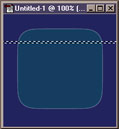 |
Open the image you want to add grooves to.
|
 |
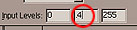  |
Choose Image > Adjust > Levels and in the middle input level box type 0.4 Move the marquee up one pixel. You can do this by using the arrow keys. Again choose Levels from the image menu and enter 2.0 in the middle input box. |
 |
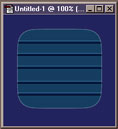 |
Move the marquee. That's it.. To do more just follow step 2. To make the grooves inverted just type in the values the other way round (2.0 first) |